
Display Rating In Foobar Search Results
Published Updated 10 years ago
**Issue: How can I display the rating of songs in the search results of foobar2000? **
The popular music player foobar2000 (or foobar, as I like to call it) offers a great solution to work through a collection of songs. Foobar also offers the option to rate songs with 1 to 5 stars. However the program does not include the possibility to display the given rating inside of the search box. With a short expression this evidently useful feature can be easily implemented.
Preparing Foobar
Open up foobar2000 and click on Library > Configure to bring up the preferences. Make your way to Playlist View within the nested tree. Add a new Custom column and paste in this pattern:
$pad($repeat(★,$meta(rating)), 5,✩)Type in a name to recognize your column later on. If your Playlist View resembles something like this, hit Ok:

Foobar Playlist View
Now open your search dialogue and click on a blank space next to the header with column names. A context menu will appear where you may choose the column you just created:

adding a column in Foobar
As the column appears you are now able to move it by drag & dropping it around. Congratulations, you just enabled the display of the track rating in foobar2000:
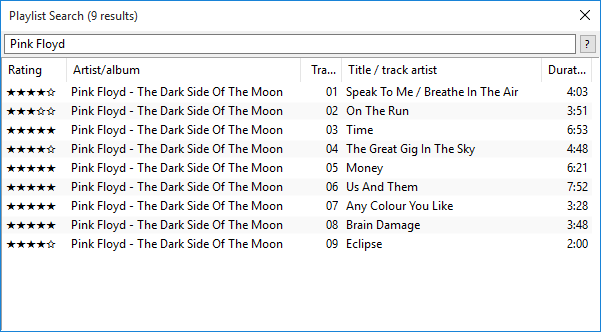
Foobar with enabled rating
The rating can also be displayed inside the Album View, using the same approach as in the search, by adding the column.
It’s a great idea to use a library search in foobar2000. Open up the preferences, navigate to Keyboard Shortcuts and set a hotkey for Library / Search. This will bring up a search box for your whole library, which you can populate and monitor in Preferences > Media Library. Of course you will be able to use your custom column here, too.
Comments
Comments are hosted on comments.itobey.dev. Loading them sets cookies and shares your IP address with that service.